
Signs someone went through your phone
Calm, practical ways to check whether someone has looked through your iPhone or Android, what each sign can and cannot tell you, and next steps.
When you suspect someone has been through your phone, you want a clear answer. Phones rarely give one. They keep traces of use, not a log of who looked at what. So the useful question is not "can I prove it" but "how much does this sign actually tell me". Below, each check comes with an honest answer to that.
If the person you suspect lives with you or could react badly, read the safety section at the end before you change anything. Changes can be noticed.
The checklist
| Where to look | What it can tell you | What it cannot |
|---|---|---|
| App switcher (recent apps) | An app you did not open sits near the top. | Apps reopen and refresh on their own. Weak on its own. |
| Screen Time (iPhone) or Digital Wellbeing (Android) | Use by the hour, including times you were asleep or away. | Who was holding the phone. Names of these screens vary. |
| Messages and email | Things marked read that you never opened, or sent items you do not remember. | Notifications and other devices on your account can also mark things read. |
| Photos: Recently Deleted and sent items | Deleted photos you did not delete, or photos sent from your phone in a chat. | Whether someone only looked. Viewing leaves no trace. |
| Browser history | Searches or pages you did not visit. | Private tabs leave nothing, and synced devices add their own history. |
| Linked devices in messaging apps and accounts | A computer or tablet you do not recognize can read along. | Nothing; this one is concrete. Remove anything unknown. |
| Extra fingerprints or a Face ID Alternate Appearance | Someone may have set up their own way in. | When it was added. Treat it as serious either way. |
| Profiles (iPhone) or device admin apps (Android) | Something may be managing or monitoring the phone. On iPhone see Settings, General, VPN and Device Management. On Android search Settings for "device admin". | Work phones legitimately have these. Check with your employer first. |
| New apps you did not install | Possible monitoring software. | Some phones preinstall apps after updates. Look each one up. |
One odd sign is worth noting, not panicking over. Families borrow phones innocently, and phones do strange things by themselves. Several signs together tell a clearer story. Linked devices, extra biometrics, and unknown profiles or admin apps are the ones that matter most, because they allow ongoing access rather than a single look.
If you decide to act
- Think about your safety first. Confronting someone can wait. Your wellbeing cannot.
- Remove what gives ongoing access. Unknown linked devices, fingerprints, Alternate Appearance, profiles, and admin apps.
- Change your passcode to one nobody has seen you type. Cover the screen when you unlock.
- Run Safety Check on iPhone. In Settings, under Privacy and Security, it reviews who and what you share with. On Android, search Settings for "safety" or review your Google Account's security page.
- Secure your accounts. New passwords for email and cloud, and two-step verification.
- If you suspect monitoring software, update the phone, and consider a reset after backing up. An advocate or a trusted technician can help you judge this.
Knowing about future attempts
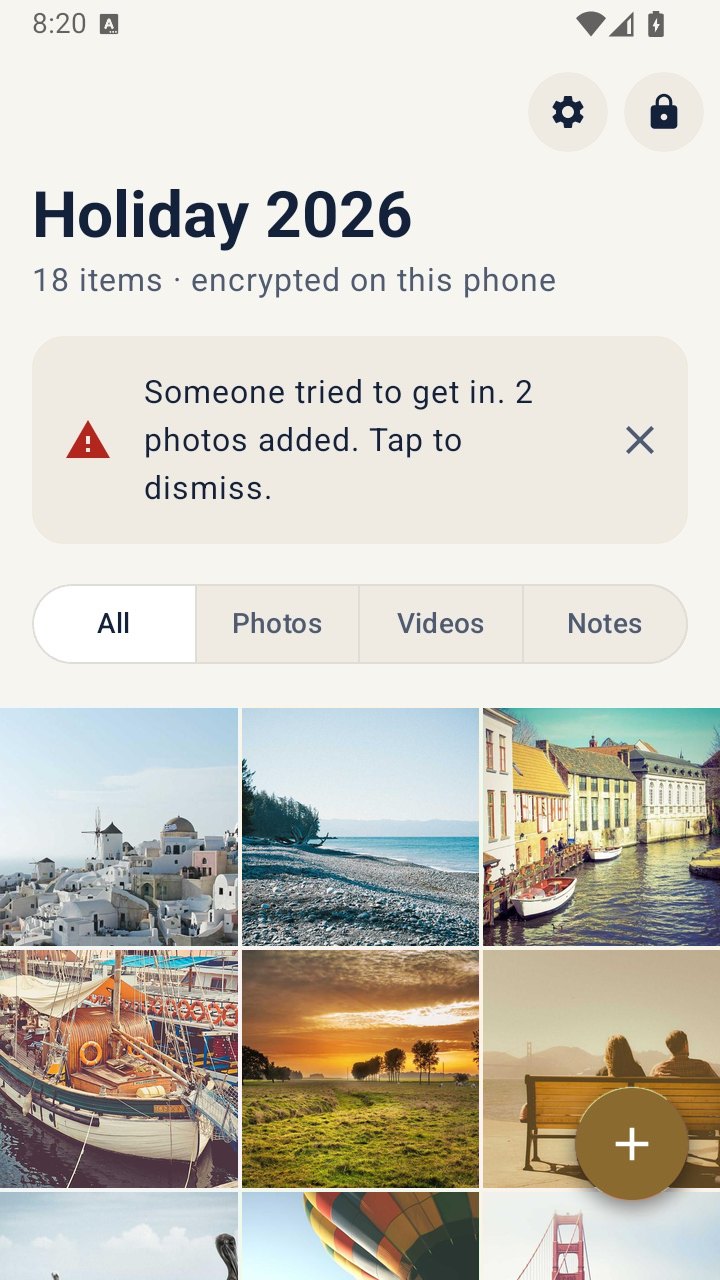
Most phones will not tell you when someone tries to unlock them. Some apps can. VaultWell, which is coming soon, has intruder snapshots: after a set number of wrong paths, it silently takes a front-camera photo, which appears the next time a vault is opened. It only covers attempts on the vault, not the rest of the phone.
If someone close to you is checking your phone
When the person is a partner, relative, or anyone with power over you, settings are the smaller part of this. Changing your passcode or adding a new app may be noticed, and could make things harder. If you can, look for help on a device they cannot reach, such as a friend's phone or a library computer.
A safety plan made with an advocate matters more than any setting. In the US, the National Domestic Violence Hotline is 1-800-799-7233, or text START to 88788. Elsewhere, contact local domestic violence services.