
Feature
Recovery phrase
A phrase of six or more words that brings a vault back if you forget its path. You write it down. We never see it.
What it is
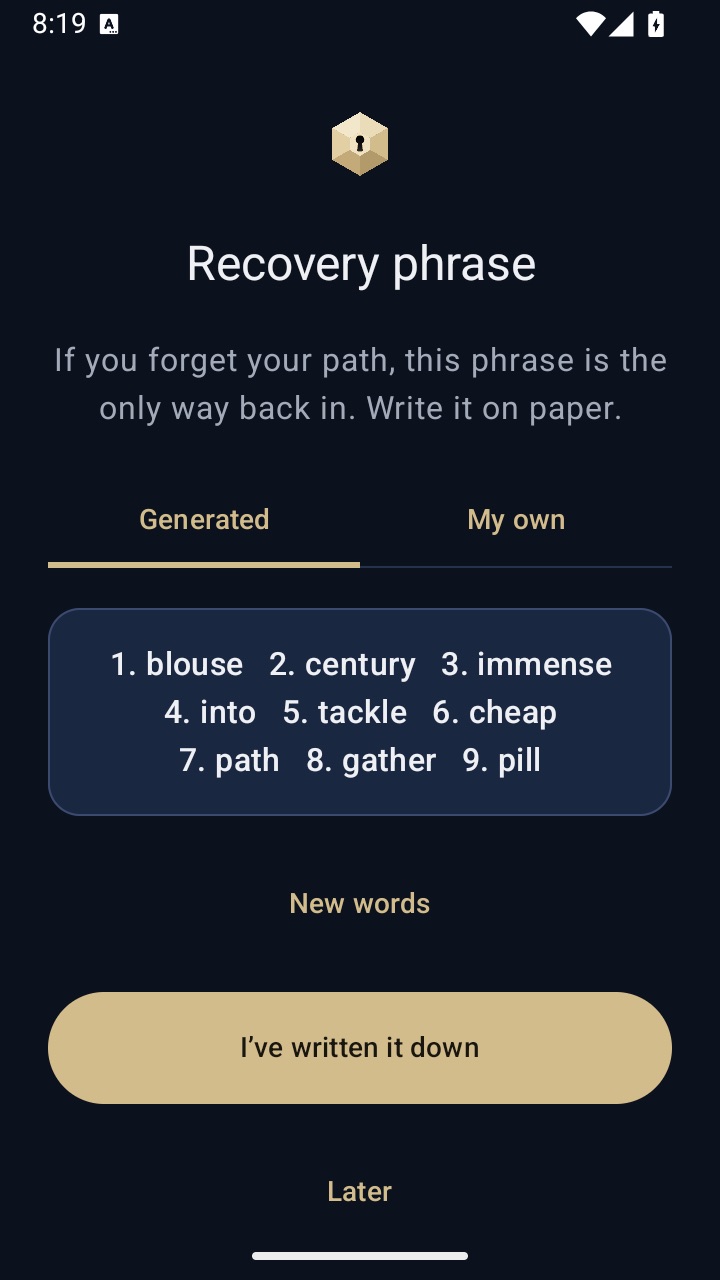
A recovery phrase is a short list of words that acts as a second way into one vault. If you forget the path, the phrase gets you back in. You can let VaultWell generate one, or write your own of at least six words.
We don't keep a copy, and there is no account to reset. That is the point: the only person who can recover the vault is the person holding the words.
How to set it up
- During setup, or later from the vault's settings, choose Set recovery phrase.
- Pick Generated for random words, or My own to type your own (six words or more).
- Write the words on paper. There is no copy or download button, on purpose.
- Type back three of the words when asked. This checks that what you wrote down is right.
Using it
On the lock screen, long-press the centre cell of the comb and choose Recover with phrase. Enter the words, and the vault opens. From there you can set a new path. A phrase can also open an encrypted backup if you've forgotten that vault's path.
How it works under the hood
The phrase is normalised (lower case, extra spaces removed), stretched with Argon2id and bound to your phone's security hardware, just like a path. The result unlocks a copy of the vault's master key. The phrase file holds no hint of which vault it belongs to, so changing the path never breaks the phrase.
A generated phrase has nine words chosen at random from a standard list of 2,048 words, which is far harder to guess than any path.
Honest limits
- If you lose both the path and the phrase, the vault can't be opened by anyone.
- Anyone who finds your written phrase and has your phone can open that vault. Keep the paper somewhere private.
- Recovering by phrase does not trigger the duress vault.
- On the phone itself, someone with deep access to the app's files could count how many vaults have a phrase set. We say more on the security page.
Questions
Why can't I copy the phrase?
Copied text ends up in clipboards, screenshots and cloud notes. Paper is slower, but it stays where you put it.
Can I replace my phrase?
Yes. In the vault's settings, choose Replace recovery phrase. The old one stops working.
Does the phrase work on a new phone?
On a new phone you restore from an encrypted backup. The phrase can open that backup if you forget the path.
Is a recovery phrase required?
It's strongly recommended, but you can choose not to set one. Without it, a forgotten path means the vault is gone.