
Feature
Duress vault
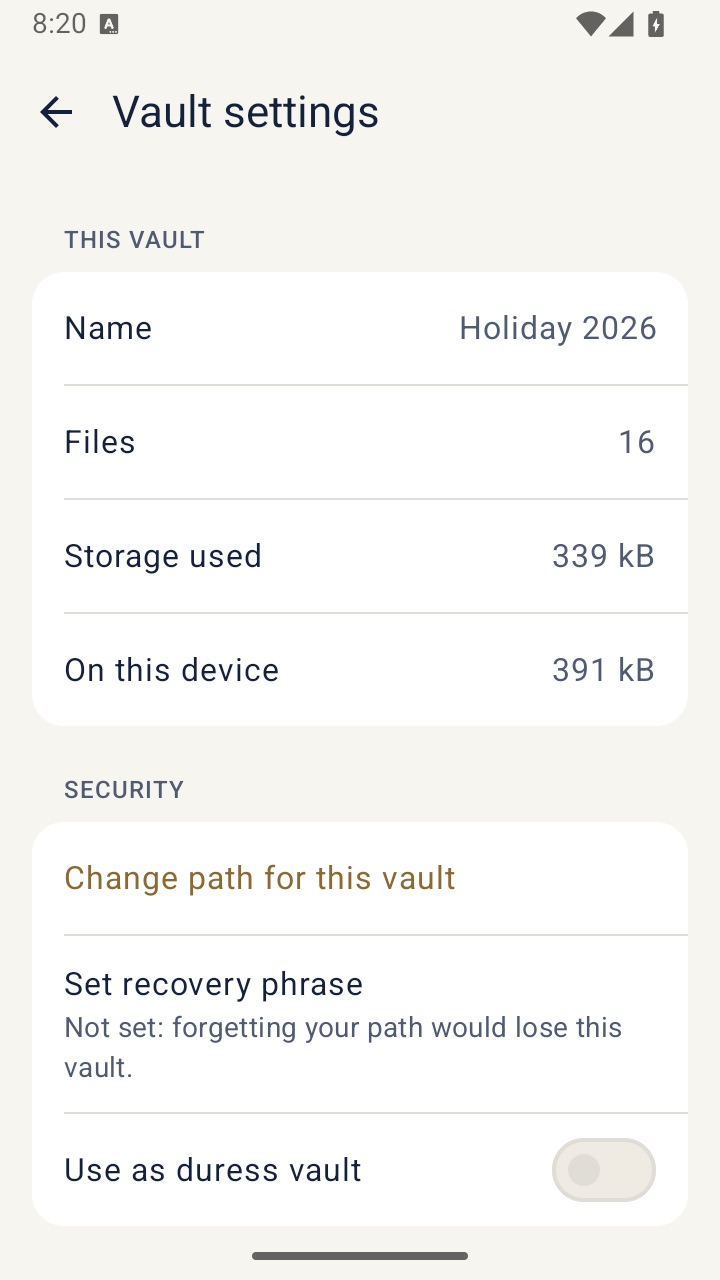
A vault to open when someone pressures you to unlock. Opening it with its path permanently erases every other vault on the phone, with no warning on screen.
What it is
A duress vault is for the rare moment when someone forces you to unlock your phone and the app. You open the duress vault with its own path. It looks like any other vault, with whatever harmless content you put in it. In the same moment, every other vault on the phone is permanently erased. Nothing on screen says this happened.
This is serious. It is designed to be final, and there is no undo on the phone.
How to set it up
- Make a backup of every vault you care about first, and keep the backups off the phone. See encrypted backups.
- Create a vault with its own path and fill it with ordinary, believable content.
- Open that vault's settings and turn on Use as duress vault.
- Read the confirmation carefully and confirm.
From then on, opening that vault with its path erases the others.
How it works under the hood
When the duress vault is opened with its path, the app first deletes the encrypted key file of every other vault and their recovery files, then removes their folders. Without those key files the data can no longer be decrypted, even if fragments remain in storage. Only after that does the duress vault appear. Its settings file is the same size as every other vault's, so the duress setting can't be spotted from outside.
Honest limits
- Erasure is permanent on the phone. If you trace the duress path by mistake, the other vaults are gone. Only backups you've stored elsewhere can bring them back.
- Backups stored off the phone are not erased. That's useful for you, and it also means anyone who has those files and the path could still open them.
- Opening the duress vault with its recovery phrase does not erase anything.
- It can't help if someone has already copied what they wanted, or if they know about the feature and expect it.
Questions
Is there a warning before the erase?
Only once, when you turn the setting on. When the duress path is used, there is no warning on screen, by design.
Can I get the erased vaults back?
Not from the phone. You can restore them from encrypted backups you made before.
Does the duress vault erase itself?
No. It stays, so whoever asked sees a normal vault.