
How to share photos privately
Practical ways to share a photo with one person while limiting who else sees it: metadata, encrypted messaging, expiring links, and honest limits.
Once a photo reaches someone else's phone, you cannot fully control what happens next. What you can choose is how it travels, what goes with it, and how long it stays. Start with a one-minute check, then pick a method that fits how sensitive the photo is.
Before you send
- Remove location. On iPhone, tap Options at the top of the share sheet and turn off Location. On Android, many share screens and Google Photos have a similar option. Details are in photo metadata and location.
- Look at the background. Crop out addresses, screens and documents. Cover other people's faces, or ask them first.
- Send the one photo. Shared albums tend to grow, and anyone added later can see everything in them.
Choosing how to send
| Method | Good for | Watch out for |
|---|---|---|
| End-to-end encrypted messenger | Most private photos to one person | The recipient's backups and synced devices |
| View once or disappearing messages | Reducing casual copies | Screenshots and a second phone's camera still work |
| Expiring or password link | Larger files, people on other platforms | Anyone with the link before it expires can open it |
| AirDrop or Quick Share | Someone standing next to you | Tapping the wrong name; metadata travels with the file |
| Email or SMS | Ordinary photos | Often stored readable on servers and easy to forward |
| Showing it in person | The most sensitive images | Nothing to forward, which is the point |
A quick decision guide
- If you would be upset to see it forwarded, use an encrypted messenger with view once, and say plainly "please do not forward this".
- If it shows a document or ID, send only what was asked for, and cover numbers that are not needed.
- If you could not live with it going further at all, show it in person or do not send it.
- If you are not sure about the recipient's phone, such as a shared family library or a phone others borrow, ask. Your photo may land there too.
Sharing a set of photos with limits
VaultWell, coming soon, can make a read-only .vwshare copy of a vault. You choose how many times it can be opened, when it expires, and whether items can be saved out. It opens with a separate share phrase that you send another way, such as in person. When the limits run out, the copy stops opening. You send the file yourself; there is no cloud link or live sharing.
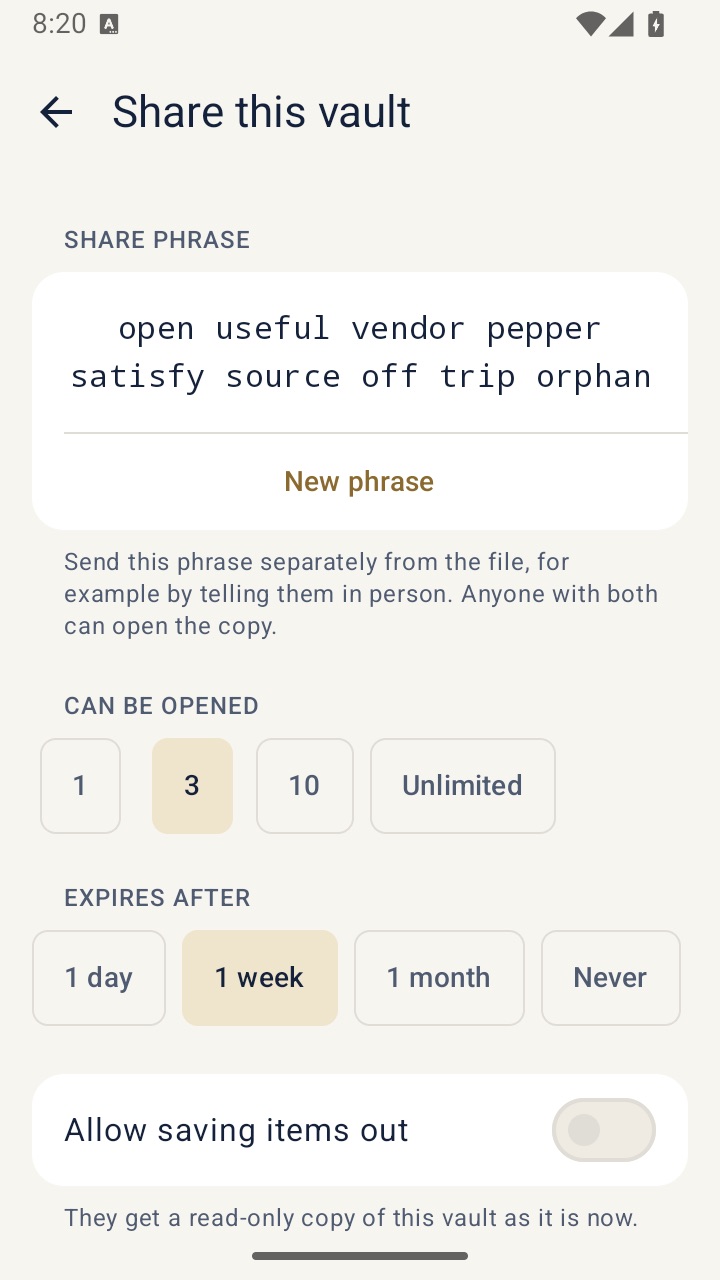
The honest caveat applies here as everywhere: someone determined who has the phrase could still copy what they see, for example by photographing the screen.
The limit no tool removes
Screenshots, screen recordings and another camera work against every app. Share with people you trust, and keep your own original as carefully as the copy you sent.
If someone is pressuring you for intimate photos, or threatening to share ones you sent, that is not your fault. See keeping intimate photos safer for what you can do.