
Duress passwords and plausible deniability
What a duress password does, what plausible deniability means on a phone, the real risks of erasing data, and how to decide if either fits.
These two ideas often get mixed up, so it helps to separate them early. Plausible deniability is about what someone can see: when they look at your phone, nothing on screen proves there is more to find. A duress password is about what happens: you enter a code that looks normal, and it does something else, such as erasing data.
Both are meant for the hard moment when someone is pressuring you to open your phone and refusing is not realistic. Both have real limits. This page covers each one, then helps you decide.
Plausible deniability, plainly
Most privacy tools announce themselves. A locked folder says "locked". A hidden album has a label. That is fine when the goal is to stop casual browsing. It is less helpful when someone asks you to open everything and then asks, "Is that all?"
Plausible deniability is about that second question. If a tool is designed well, the answer "yes, that is all" cannot be disproved from the screen alone. The person may still suspect something, but the phone gives them nothing to point at.
It is not invisibility. It does not stop forensic tools from noticing that an app holds encrypted data, and it does not change what the law requires of you. It is a design property that limits how much a casual or pressured look can reveal.
Apps try to provide it in a few ways:
- No counts or lists. The app never shows how many vaults or albums exist outside the one that is open.
- A neutral first screen. The lock screen looks the same whether one vault exists or five.
- Decoy content. One code opens an ordinary set of photos, another opens the private ones. This only works if nothing hints that a second set exists.
Built-in tools such as the iPhone Hidden album, Google Photos Locked Folder and Samsung Secure Folder were not built for this. Their existence is visible in the app or in Settings. That is not a flaw; they were made to keep things out of the main grid, and they do that well.
What a duress password does
Different tools do different things when a duress code is entered. Some open a decoy. Some erase protected content, quietly or with a message. A few security systems send a silent alert, though most phone apps do not.
iPhone and standard Android do not offer a duress passcode for the phone itself. Both can be set to erase after many failed attempts, and iPhone has Emergency SOS, but those are different things. Auto-erase triggers after repeated wrong guesses; a duress code triggers when one specific code is entered. Duress codes are mostly found inside individual apps and on some specialized phones.
The risks of erasing
A duress code that erases is a serious tool. Before setting one up, weigh these honestly:
- It is permanent. If you need those photos later, as evidence or as memories, they are gone unless a backup exists elsewhere.
- Mistakes happen under stress. Two codes that feel similar can be mixed up at the worst moment.
- Legal consequences. Deleting data during a legal process, such as a border check or a police investigation, may be treated as destroying evidence or obstruction in some places.
- Escalation. If someone realizes data was erased, they may react badly. In an abusive relationship, that can increase danger.
Rehearse while nothing is at stake. Learning that two codes feel too alike by erasing your real photos is a costly lesson.
If this, then that
- If you mainly want photos out of the main gallery, a built-in hidden or locked album is probably enough. You may not need either idea on this page.
- If someone knows your phone passcode and browses, a separate vault with its own unlock solves most of it. Deniability helps if you do not want them to know the vault holds anything; erasing is rarely needed.
- If you expect to be pressured to open an app, hidden vaults with an ordinary visible layer may be the gentler choice. Keep the visible vault believable, with ordinary recent items rather than three old photos.
- If you would truly rather lose the content than have it seen, a duress vault fits. Back up anything you cannot lose first, to a place away from the phone.
- If you are facing officials, a court process, or a border, do not rely on either without advice. Misleading an official or deleting data can be an offense in some places. Speak to a lawyer.
- If the person pressuring you may become violent, talk to an advocate before relying on any app. A safety plan matters more.
How VaultWell handles both
VaultWell, coming soon for iPhone and Android, was designed with deniability in mind. There is no account. Each hidden vault opens with its own path traced on a honeycomb, and nothing on screen shows how many vaults exist. The lock screen is only the comb, with options behind a long-press.
It also has an optional duress vault. It opens with its own path like any other vault. Opening it permanently erases every other vault on the phone, with no warning on screen. That cannot be undone; the only way back is an encrypted .vwbackup file you exported earlier and stored somewhere else.
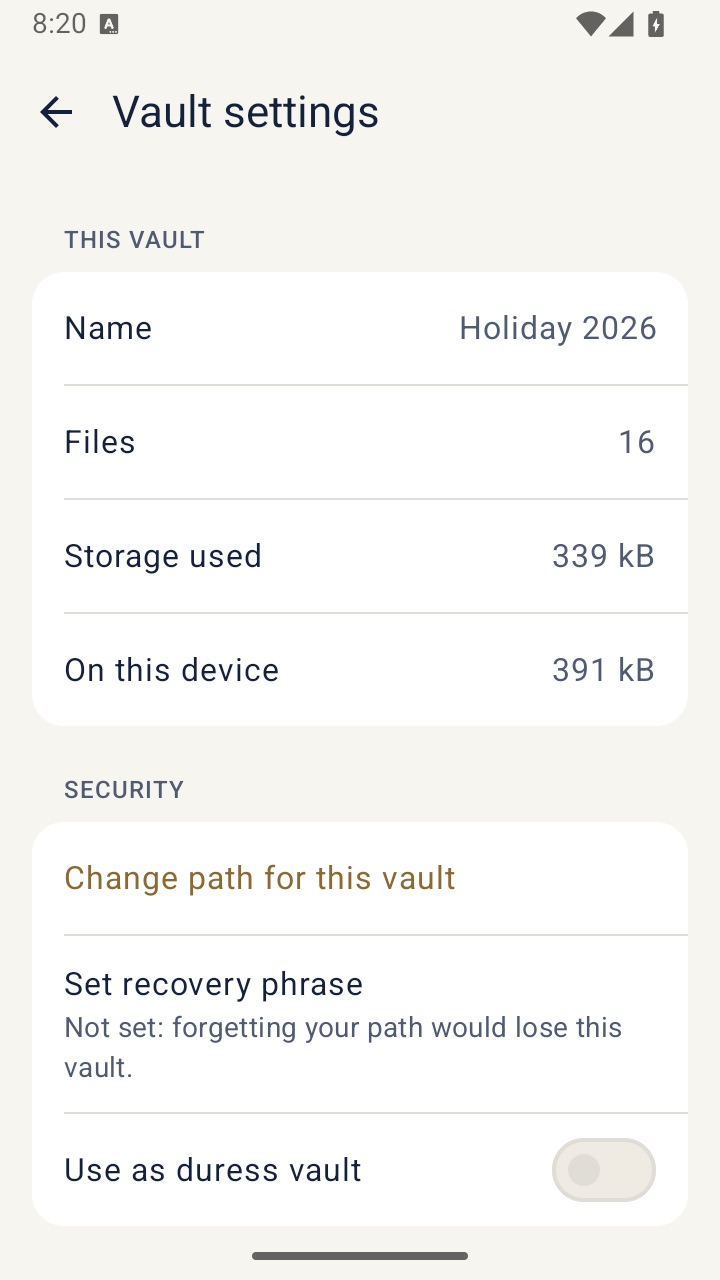
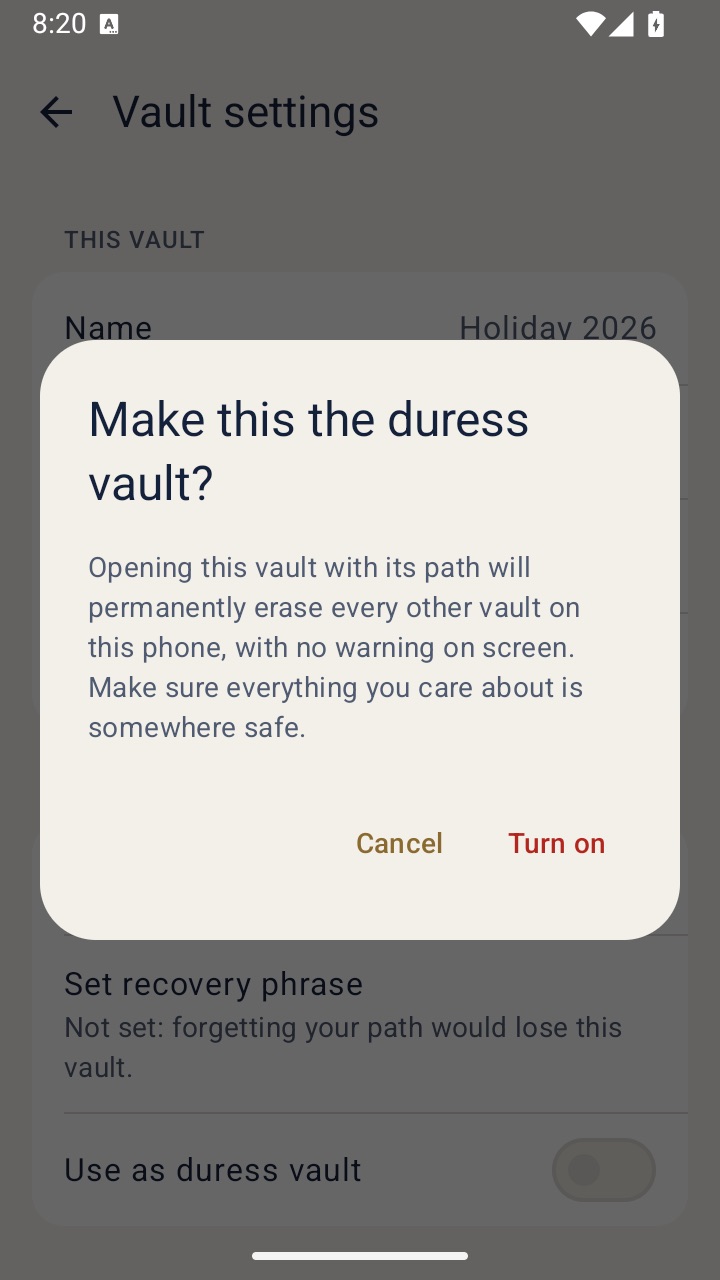
Many people will never need the duress vault. Hidden vaults alone may be enough. More detail is on the duress vault and plausible deniability pages.
Where both ideas stop
Deniability is only as strong as its weakest trace. A photo that also sits in a cloud backup, a chat thread, a shared album or Recently Deleted is not hidden there. Someone who watched you trace a path may remember it. A determined person may not believe you, whatever the screen shows.
A duress code cannot erase copies held elsewhere, including backups or forensic images taken before it was entered. And it cannot make anyone believe you.
This is general information, not legal advice. Laws about unlocking devices, deleting data and speaking to officials differ by country and situation.
If you are in an abusive situation, a safety plan with an advocate matters more than any app. In the US, the National Domestic Violence Hotline is 1-800-799-7233, or text START to 88788. Elsewhere, contact local domestic violence services. Phone activity can be monitored, and a vault app may itself be noticed, so use a safer device if you can.